
Agent-X Advanced
End user automations across the applications your clients run.
Agent-X Advanced lets you build those automations, per client, and charge for them. It is the fourth step in the sequence below, and it is not available yet: beta later in Q4, for MSPs already running Agent-X.
There is no partner tier, no certification and no minimum commitment to qualify. An MSP who buys this is a partner, which is why this page is about the sequence rather than about a program you join.
The gap
Automation in this industry points at the back office.
Almost everything an MSP can buy under the word automation is aimed at the same place: the engineer. RMM scripting, PSA workflow rules, ticket routing, and now assistants for the service desk. The unit of value is engineer time, and all of it happens behind the client rather than in front of them.
What almost nobody sells you is automation you deliver to your client’s staff, for their productivity rather than yours. Their people still raise a ticket and wait, for the same handful of requests, every week.
Steps one and two below are that back office work and we do it. Steps three and four are the underserved half: automation pointed at the everyday user, inside an application carrying your name. That is where Agent-X and Agent-X Advanced sit, and it is why this is not one more automation tool for your engineers.
The method
The order is the method.
These are not four things to buy in whatever order suits the quarter. Each one is run on your own business before it reaches a client, which is where the learning happens and where a mistake costs you nothing but your own time.
That includes Agent-X. Before it goes to a client’s staff it goes to yours: your own people raising the same everyday requests, in your own tenancy, with you watching what it does and adjusting what it is allowed to do. By the time a client sees it you have run it, tuned it and formed a view. You are not piloting a vendor’s product on your customer’s users.
Each step also makes the next one possible. Your engineers adopt Assist-X, which measures every ticket, which is what Command reads. Agent-X goes out once your own desk is running. Advanced is built on Agent-X.
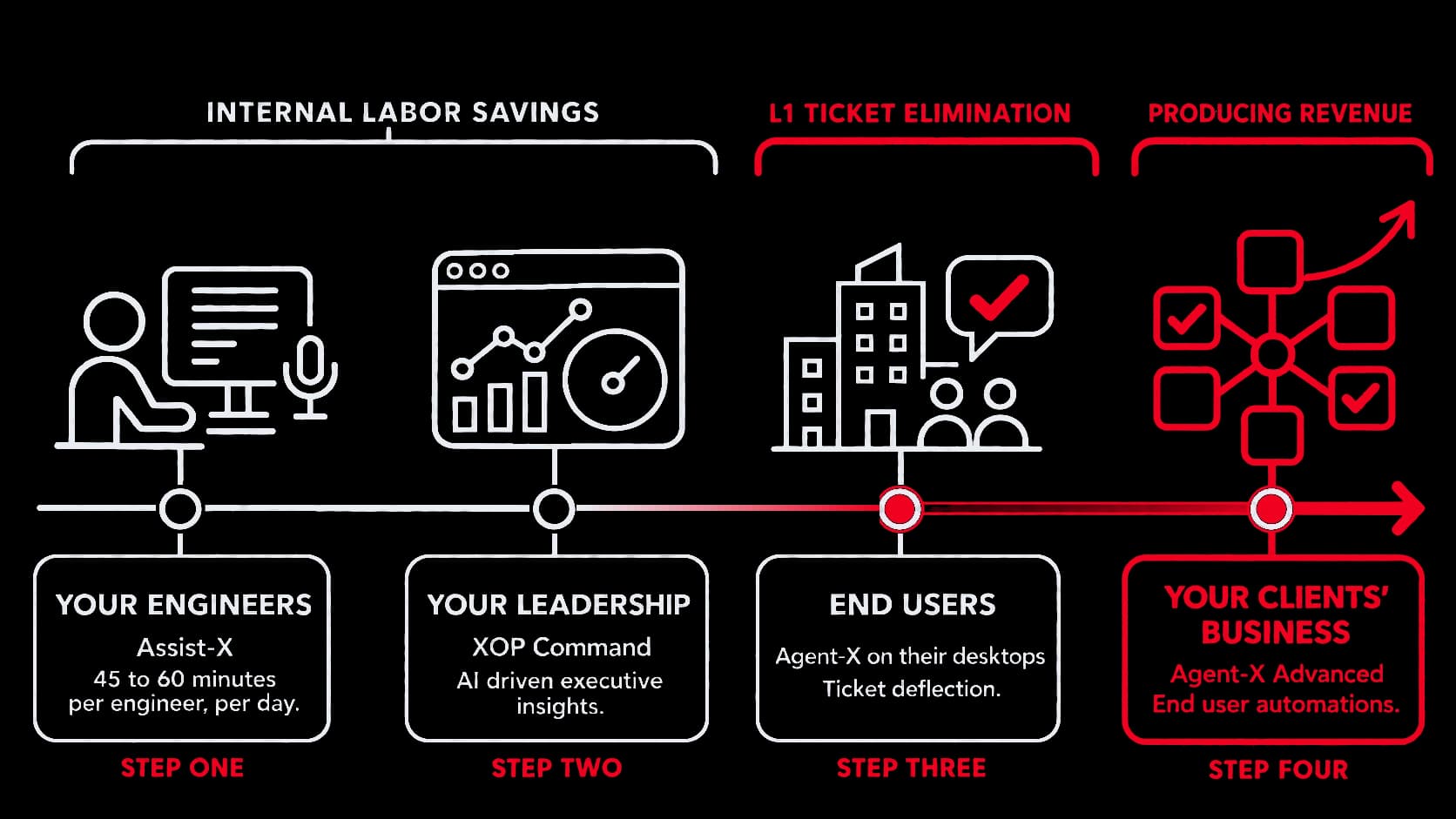
Step one
Your engineers
Assist-X
It runs inside the PSA they already have open, so there is nothing to learn and nowhere new to go. It hands back 45 to 60 minutes per engineer per day, and under a fixed-fee agreement every one of those minutes is cost that left your P&L.
What Assist-X doesStep two
Your leadership
XOP Command
Because your engineers use Assist-X, every ticket gets measured. Command is what that measurement becomes: escalations, client health, engineer coaching and dispatch, all running off one score per ticket. It costs you nothing extra to collect, because step one already did.
What XOP Command doesStep three
End users
Agent-X
An application on your clients' desktops carrying your name, handling the machine that is broken, the person locked out, and the request for access to something. Deploy it across your whole client base, or only where it fits. Every request it resolves lands in your PSA statused and sourced as Agent-X, so the work it took off your desk is countable with an ordinary report in your own system.
What Agent-X doesStep four
Your clients' business
Agent-X Advanced
The same agent, pointed at the applications your client runs to operate their company rather than at the ones you support for them. You build the automations, per client. This is the step you can charge for.
Availability
Agent-X enters beta in October 2026. Advanced follows in beta later in the quarter, and only for MSPs already running Agent-X, because it is built on top of it. It is documented here so you can plan around it, not because you can buy it this quarter.
What it changes
The work moves from their IT to how their business runs.
Step three is IT, because that is where your right to act already is. Step four points the same agent at the rest: the CRM, the finance system, the HR platform, the document store, whatever this particular client runs. Around 1,500 business applications are reachable, and which ones matter is a question about that client rather than about our roadmap.
That changes what you are to them. Automating an approval that has been sitting in somebody’s inbox for two days is not IT support. It is their business process, and you are the one who fixed it. The industry has a name for the move now, the managed intelligence provider: an MSP whose product is the intelligence layer itself, carrying their brand and billed as their own recurring line rather than passed through from somebody else.
That transition is being asked of MSPs whether or not they have a way to make it. Help desk and user support are the floor now rather than the offering, and the providers answering it are the ones solving business problems instead of tickets. This is the mechanism for doing that: the same agent, the same approval model, pointed at work that is not IT.
- The approval that lives in email
- A purchase order waiting on someone who is in a meeting. An expense report that has been sitting in a folder since Thursday. The agent takes the request, routes it to whoever actually owns the decision, and records the outcome.
- Joiner and leaver, past the IT part
- You already handle the account and the mailbox. The rest of it, the HR record, the systems their role needs, the equipment request, is the same shape of work and it is currently done by hand by somebody at the client.
- The request their staff make every week
- Every client has one. The engineer who keeps handling it knows what it is, and it is specific to that client rather than to the category they are in.
The approval model underneath all three is the one Agent-X already uses: the request goes to the person who owns the decision, it waits, and the outcome is recorded. How the agent decides what it may do.
How you build one
You describe it. You do not code it.
Building an automation is prompt-based. You say what should happen, in plain language, and you test it against the client’s systems before it is live.
- You describe it, you do not code it
- The automation is written in plain language, the way you would explain the job to a new engineer. There is no integration project, no development cycle, and nothing to hand to a programmer.
- The connections are already there
- You are not building the plumbing. The applications are already reachable, so the work in front of you is deciding what should happen rather than making it possible.
- Tested before anyone sees it
- You run it against the client's own systems and watch what it does, before a single member of their staff can reach it. The same principle as nothing posting to a ticket until an engineer approves it.
Control
You are putting an agent in front of your clients. You decide what it may do.
Reselling somebody else’s agent means taking a risk on your clients’ behalf, in their tenancy, under your name. So the control model was designed before the capability list was. It also answers the case that will come up in your first ten accounts: a client in a regulated industry who wants no end-user automation at all. That is a setting, not a problem, and you are not obliged to install Agent-X anywhere it does not fit.
- Twelve decisions, not eighty
- Every tool the agent has belongs to one of twelve groups, and every group has one setting. You answer twelve questions rather than auditing a tool list.
- Six positions per group
- Automatic, the user confirms, ask the resource owner, ask an engineer, off, or not governed. Off means the agent does not offer it and does not mention it.
- Set once, overridden per client
- Your house position applies everywhere, and a client who wants nothing automatic gets their own answers without you maintaining a matrix.
- Advertised never beats your setting
- What a tool can do in principle does not override the position you set for that client. The agent does not negotiate with a user, and it does not route around your answer by rephrasing the request.
Two of the twelve ship off, including anything capable of unbounded execution. The twelve groups, and where each one ships.
Our side of the bargain
We do not go around you.
Every MSP has been disintermediated by a vendor who started as a supplier. It is a reasonable thing to be wary of, so here it is in writing.
- We do not market to your clients' staff, and there is no end-user marketing anywhere on this site.
- We do not sell to your clients directly, then or later.
- We do not put our logo in front of the people you serve as a condition of anything.
- Your client list is not a prospect list, and we have no product that would make it one.
The money
What we publish, and what you set.
Steps one and two are on the pricing page: Assist-X at $55 per engineer per month with a ten engineer minimum, and $500 a month for XOP Command with five manager licenses, which is also its minimum.
Agent-X commercials are not published, because it enters beta in October and the MSPs in that group are helping set them. We would rather agree terms with you than publish a number we have to walk back in December. Advanced is behind it and is not priced either.
What you charge your own clients is yours. We do not suggest a retail price and we do not police one. That matters most on Advanced, because the automations you build for a client are your work rather than a licence you are passing through, and pricing them is not our business.
Config guides
Thirteen guides. About two hours, all in.
Written for whoever is actually going to do the work, each one self-contained, each one carrying its own time estimate. Most MSPs need five of them: your PSA, your documentation platform, SSO, and whichever delivery surfaces your engineers use. The rest are there when you want them.
- ConnectWise Manage API setup
- ConnectWise admin
- 15 min
- Autotask PSA API setup
- Autotask admin
- 15 min
- SharePoint integration
- Microsoft 365 global admin
- 15 min
- Microsoft Entra SSO
- Microsoft 365 global admin
- 5 min
- IT Glue API key
- IT Glue admin
- 5 min
- AI ticket routing in ConnectWise
- ConnectWise admin
- 10 min
- Escalations board
- Service desk admin
- 10 min
- Microsoft Teams chatbot installation
- Teams admin
- 10 min
- Rebranding the Teams bot as your MSP
- You
- 5 min
- Autotask engineer Chrome extension
- Engineers
- 5 min
- Voice transcription and call recording
- Engineers
- 5 min
- Mobile app engineer setup
- App admin and engineers
- 10 min
- ConnectWise pod visibility troubleshooting
- ConnectWise admin
- 10 min
The portal is password protected, because the guides name the permissions and the settings inside your own systems. Open the config portal, or ask us for the password when you are evaluating and we will send it.
Where to start.
Start on your own desk. Put Assist-X in front of a pilot group of your own engineers and find out whether they will give it back. Everything after that is the same platform reaching further out.
Partner and integration opportunities go to partner@xop.ai.