Introducing xop.ai Mobile PSA: The First AI-Native Mobile App for ConnectWise Manage
ConnectWise Manage has never had a mobile app worth opening — so field engineers work from memory and update tickets hours later, if at all. xop.ai Mobile PSA changes that: the full power of the desk, plus an AI copilot, in your pocket.
Ask any MSP engineer who works in the field about the ConnectWise Manage mobile experience and you will get the same look. It is thin, clunky, and most techs simply avoid it — they jot notes on paper, hold time entries in their head, and reconstruct the day from memory once they are back at a desk. Billable time leaks. Tickets go stale. Documentation never gets written.
We built xop.ai Mobile PSA to close that gap — and to do it the way 2026 demands: AI-native, deeply integrated, and genuinely fast to use one-handed between appointments.
A first for ConnectWise Manage
To our knowledge, there has never been a state-of-the-art mobile app for ConnectWise Manage. xop.ai Mobile PSA is the first — fully wired into ConnectWise and IT Glue, bringing the full power of the ConnectWise Pod to your phone, with the same AI engineer-assist your team already relies on at the desk.


What it costs to leave field engineers without a real app
- ✕Lost billable time. Time entries reconstructed at the end of the day are always lower than the work actually done.
- ✕Stale tickets. Clients chase status because updates do not happen until the engineer is back at a keyboard.
- ✕Double-entry burnout. Techs do the job once on-site, then again at night re-typing notes — and resent it.
- ✕Missed opportunities. Upsell signals and documentation gaps spotted on-site are forgotten by the time anyone could act on them.
Everything Your Engineers Do — Now in Their Pocket
xop.ai Mobile PSA is not a stripped-down companion app. It carries the workflow and the AI that make the desk experience powerful. Explore what it does:
The full service-desk workflow, untethered from the desk.
Your schedule, live
See the day the AI Schedule Board built for you — appointments, tickets, and priorities, right on your phone.
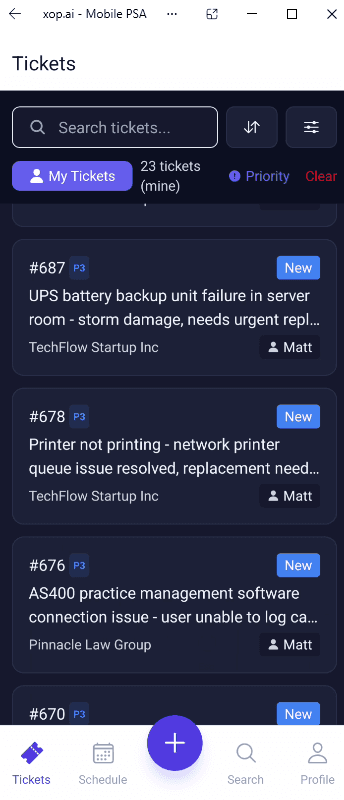
Open and work tickets
Full ticket access from ConnectWise Manage: review, update, and resolve from the field.
Escalate in a tap
Hand a ticket up to the right engineer without waiting until you are back at a desk.
The schedule they open is the schedule the AI built
Mobile PSA is the field half of the loop. Our AI dispatch and scheduling engine decides who works what and when; Mobile PSA is where the engineer receives that day and executes it. Assign on the Schedule Board, work it from the phone — one continuous flow.
What It Means for Your Business
Field Engineers
Work the whole ticket on-site, dictate notes by voice, and never re-type the day at 6pm. The app helps you resolve, not just record.
Service Managers
Real-time ticket updates from the field, accurate time capture, and escalations that move before an engineer is back at a desk.
MSP Owners
Recover billable time that leaks in the field, surface more upsell, and give techs a tool they will actually use — a real edge in hiring and retention.
Mobile PSA extends the xop.ai engineer experience — the same AI behind the ConnectWise Manage Pod, voice engineer assist, sales opportunity generation, and auto client documentation — now in the hands of every engineer in the field.
For any MSP with engineers who leave the building, this app will be a must.
A Must-Have for Field Engineers
xop.ai Mobile PSA is live now on the Apple App Store and Google Play. Download it today — or book a demo to see the full ConnectWise Manage workflow in action.